From ClickOps to Code: Why I Introduced Terraform to Our Team
On this page
As we’ve shipped more services, our cloud infrastructure has grown larger and more complex to manage. Yet we still create and change resources by hand in the console, which has left us with orphaned resources, drifting environments, a growing cloud bill, and an exhausted team. Since joining the team, I’ve been pushing to adopt DevOps practices, and Terraform became the Infrastructure as Code (IaC) tool on our roadmap.
The Main Problems I Noticed
Orphaned Resources
When developing a new service, we used to create a series of experimental cloud resources manually. For instance, in order to get a minimal environment, we needed to create a new Virtual Private Cloud (VPC), a subnet, a Cloud Router, a Cloud NAT, and a Compute Engine VM. Sometimes, whoever created the environment forgot to delete all of them and left them active even after they resigned. In addition, no one knew what would break if we deleted those resources, so no one did. Unused resources piled up, and our cloud bill kept growing for nothing.
Inconsistency Across Environments
After we developed and tested a new service, we needed to create a production environment. But there were dozens of settings we needed to configure for a complete and secure environment: IAM roles, firewall rules, network policies. It was easy for us to make a tiny mistake and create a mismatched environment. The service that worked perfectly in testing broke after release. There is no checklist that can catch every human error, especially when the steps live only in someone’s memory.
Wasted Engineering Time
It was frustrating to work in a messy, poorly managed cloud environment. We needed to schedule time to check every historical orphaned resource and figure out what deleting it might break. Before every release, we needed to make sure every production setting was correct. None of this work shipped a feature. All of it was avoidable.
How We Put Terraform to Work
Terraform is an infrastructure as code tool that lets you build, change, and version infrastructure safely and efficiently. — HashiCorp
HashiCorp did a wonderful job on their Terraform documentation. You can easily learn Terraform by reading their document. So this isn’t a tutorial. Instead, here’s what we changed in how our team works.
Treat it as Code
Once infrastructure lives in code, it gets everything code gets: version history, code review, CI/CD pipeline and early error detection.
Every Change Has an Owner and a Reason (Ticket)
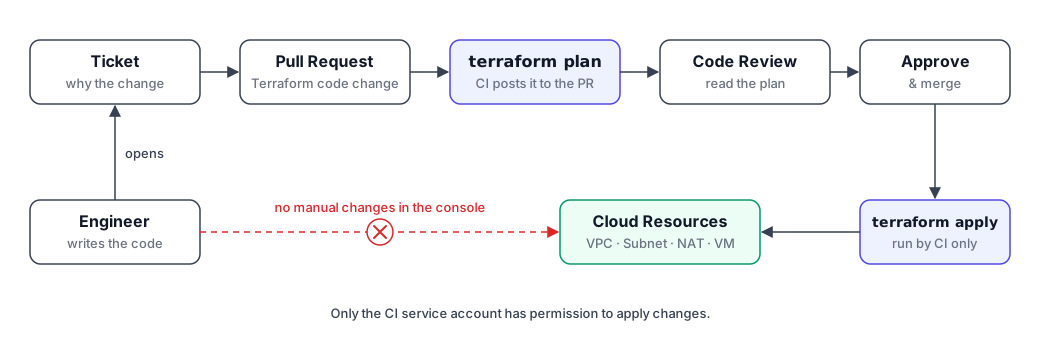
We store our Terraform code in git and link every pull request to a ticket. Now we can see not only who made the change but also why. Every resource our team owns is declared in code, so anything missing from the code immediately stands out. When an experiment ends, we run terraform destroy with confidence instead of guessing what’s safe to delete.
Remote State
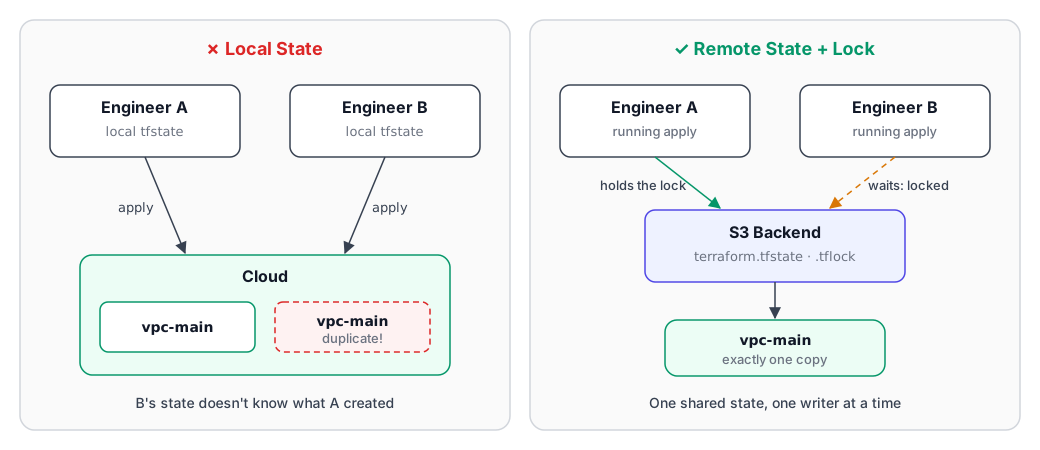
Terraform relies on its state file to know which resources it manages. If each engineer keeps a local copy, Terraform on one laptop has no idea what another laptop created, so it creates everything again. A local state file can also be deleted by accident. That’s why we keep ours in a remote backend
terraform {
  # ...
  backend "s3" {
    # ...
  }
}
State Lock
If two team members apply the Terraform code at the same time, it will cause a race condition and corrupt the state file.
terraform {
  # ...
  backend "s3" {
    #...
    use_lockfile = true
  }
}
Terraform Module
We can get consistency across environments by using Terraform modules. We just use the same source but different tfvars.
# in production/service/main.tf
module "service_prod" {
  source = "./modules/service"
  environment_name = var.environment_name # production in its terraform.tfvars
  #...
}

# in staging/service/main.tf
module "service_staging" {
  source = "./modules/service"
  environment_name = var.environment_name # staging in its terraform.tfvars
  #...
}
Apply Only Through CI/CD Pipeline
We agreed that Terraform changes are applied only through our CI/CD Pipeline. We can easily configure who can apply the Terraform. Every change now appears as a terraform plan in a pull request, where reviewers can see exactly what will change before it happens.
Conclusion
Terraform gave us what the console never could: a single source of truth for our infrastructure, and a preview of every change before it happens. But the tool was the easy part. The hard part was changing our habits. Clicking through the console is fast when you’re in a hurry, and “just this once” is always tempting. If you’re introducing IaC to your own team, start by showing them the benefits by hands-on experience, and the habits will follow.