Deep Dive Into AI Agent
隨著 LLM 越來越聰明,所支援的 Context Window 越來越大,相關的應用開始從單次的 LLM chat 到現在每間公司都在嘗試產品化的 AI Agent。 Agent 本身到底是什麼呢?
對話
從最小的 LLM 對話開始
from google import genai

client = genai.Client(...)
user_prompt = input("> ")
response = client.models.generate_content_stream(
        model="gemini-3.1-flash-lite",
        contents=user_prompt
    )

for chunk in response:
 print(chunk.text, end="", flush=True)
多輪對話
Agent 的最底流程其實也就是一個 While True 的 loop, 裡面會把每次 User 的 prompt 以及 LLM 的 Response 不停累積在 History 的 List 裡面 (每次可能都會存在 DB 或是其他 file 裡面)
from google import genai

history = []

client = genai.Client(...)

while True:

 # Get User Prompt
 user_prompt = input("> ")
    if not user_prompt.strip():
        continue
    if user_prompt.strip() == "/exit":
        print("Happy Coding!!")
        break
 # Add User Prompt to History
 history.append(Message(role="user", text=user_prompt))
 contents = message_to_contents(history)

 # Ask LLM
 response = client.models.generate_content_stream(
        model="gemini-3.1-flash-lite",
        contents=contents
    )

 text = response.text or ""

 # Add LLM Response to History
    history.append(Message(role="assistant", text=text))

    # Show Result to User
 print(text)
如何使用工具呢?
LLM chat 非常有局限性,例如:
- 時效性: LLM 模型不可能每天都把資料即時的訓練 LLM 模型,現在使用的模型可能是去年訓練完 freeze 的, 那如果想詢問 up to date 的問題呢?
- 互動性: LLM 模型如何跟外部的系統做互動呢?
- 不確定性:LLM 模型是 non-deterministic 的, 例如問他
strawberry有幾個r有時候也會錯誤
這時候就可以讓 LLM 去使用我們寫好的 function 去做 web search, call api 或是執行 deterministic 的邏輯
Function Calling
現在的 LLM 模型基本上都支援可以傳一個 tool List 做使用, tool 本身包含
name: function 的名字,可以用來作dispatchdescription: 用來讓 LLM 知道什麼時候可以用以及怎麼用這個 toolfunction args: 讓 LLM 知道要傳入哪些參數
...

response = client.models.generate_content_stream(
        model="gemini-3.1-flash-lite",
        contents="1 + 2 = ?",
        config=types.GenerateContentConfig(
                tools=[types.Tool(function_declarations=[
                 types.FunctionDeclaration(
                  name="add",
                  description="Add Two numbers",
                  parameters_json_schema={
                   'properties': {
                    'num1': {
                     'title': 'Num1',
                     'type': 'integer'
                 },
                 'num2': {
                  'title': 'Num2',
                  'type': 'integer'
              }
          },
          'required': ['num1', 'num2'],
          'title': 'add',
          'type': 'object'
      }
                 )
                ])]
            ),
    )
...
candidate_content = None
function_calls = []
if response.candidates:
 candidate_content = response.candidates[0].content
 if candidate_content:
  parts = candidate_content.parts or []
        function_calls = [p.function_call for p in parts if p.function_call]

...

for fc in function_calls:
 print(fc.name) # add
 print(fc.args) # {num1: 1, num2: 2}
Skill 是什麼?
當我們有越來越多種任務想交給 Agent 去做之後, 將所有的 Domain Knowhow 或是工作流程都寫在 System Prompt 會導致 Context 的浪費,於是傾向使用漸進式揭露的 Skill 注入資訊到 Context 內。
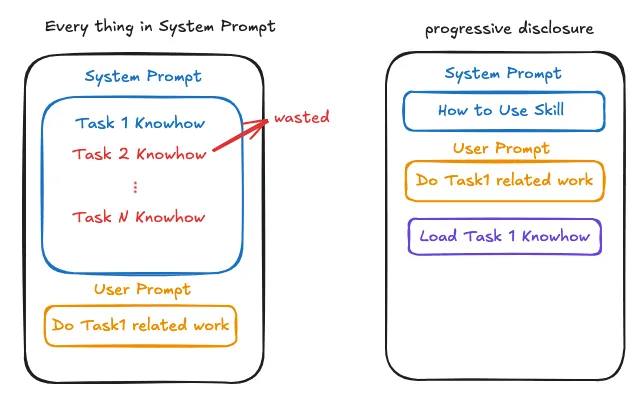
而 Skill 本身其實就是一個可以去讀取某個資料夾內文件內容及執行 script 的 tool。 會多注入一個 Tool,例如 get_skill_instruction, 且 System Prompt 裡面會有如何去使用 Skill 的指令,例如
<available_skills>
 You have access to a set of skills listed below. Each skill is shown only as a
 short name and description — the FULL instructions live in a separate file and
 are NOT included in this prompt.

 ...

 <procedure>
  1. Read every <skill_description> below.
  2. For each, ask: could this skill plausibly apply to the user's task? (1% counts.)
  3. If yes → call `get_skill_instruction(name=...)` with that skill's exact name.
  4. Follow the returned instructions exactly. Do not paraphrase or shortcut them.
  5. If no skill applies, proceed normally.
 </procedure>

 Never guess or invent a skill's behavior from its description alone — the
 description is only a hint for matching. The real instructions are only
 available via `get_skill_instruction`.

 <skills>
  <skill_name> Foo Skill </skill_name>
  <skill_description> When to use this Foo Skill and when not to </skill_description>

  <skill_name> Bar Skill </skill_name>
  <skill_description> When to use this Bar Skill and when not to </skill_description>
 </skills>
</available_skills>
他解決了 Context Window 有限的問題, 當需要 Skill 的時候才會把需要的訊息載入,也可以使用定義好的 Script 去得到某個 deterministic 的 sub-result。 然而 Skill 本身也有局限
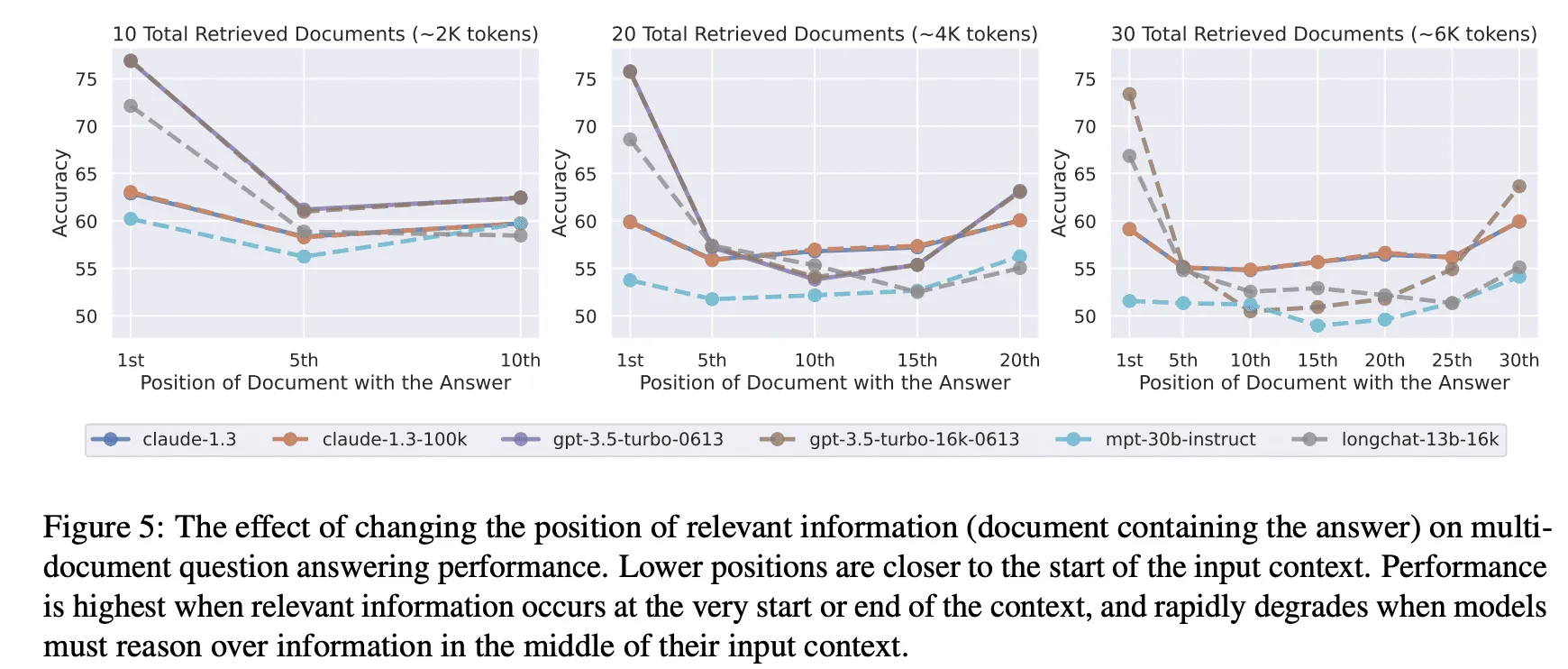
- 本質上也只是把 prompt inject 到 context 裡面, 隨著任務進行 Skill 本身的資訊就可能被稀釋掉 (Lost in the Middle)
- 使用的前提是 LLM Model 判斷要使用這個 Skill 才會載入,相反的如果 LLM 沒有載入的話就沒用
Context Engineering
我們先大致看一個 Agent 的 Flow
history = []

while True:

 # Get User Prompt
 user_prompt = input("> ")
 # Add User Prompt to History
 history.append(Message(role="user", text=user_prompt))
 contents = message_to_contents(history)

 for _ in range(MAX_TOOL_ITERATION):
  # Ask LLM
  response = client.models.generate_content_stream(
         model="gemini-3.1-flash-lite",
         contents=contents
     )

  if not function_calling(response):
   print(response.text)
   # Add LLM Response to History
      history.append(Message(role="assistant", text=text))
      break

  # get tool response and send to LLM in next iteration
  tool_response_parts = []
  for fc in function_calling(response):
      func = tools_registry[fc.name]["func"]
   result = func(**dict(fc.args or {}))
            tool_response_parts.append(
    types.Part.from_function_response(
     name=fc.name or "",
     response={"result": result},
    )
   )
  contents.append(types.Content(role="user", parts=tool_response_parts))
這邊我們先關注 contents 裡面包含了哪些東西。
- history
- system_prompt
- user_prompt
- tool result ( 這邊可能包含了 tool, RAG, Skill 等等 )
這個 contents 就是 LLM 的 Context。 而問題是該放哪些東西給 LLM 能夠讓它在任務上表現得最好呢? 直覺上隨著 LLM 模型支援的 Context 越來越大,我們可以將所有東西都餵給 LLM 並祈禱它表現良好。 但是事實上隨著 Context Window 中 token 數量的增加,模型準確回憶上下文資訊的能力會下降 (Context Rot), 並且隨著任務的進行許多細節的注意力也會逐漸被稀釋 (Lost in the Middle),所以如何決定有哪些東西要進 Context 就是 Context Engineering。 大致有以下幾種面向考慮
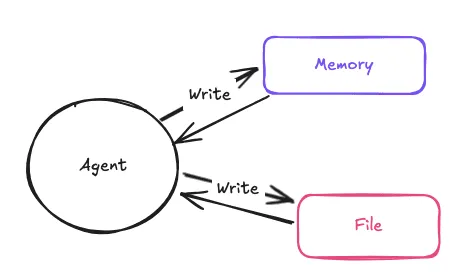
Write
把資訊寫到 context 外部,如 memory 或是檔案,需要時再讀回。
Select
在每次任務前要怎麼將有用的資訊放進 Context 內呢? 主要有 3 種
- Rule-Base Select: 例如預先規定一定要載入 CLAUDE.md
- Model-Base Select: 依任務挑選要載入的 skill
- Retrieval-based Select: 使用相似度分析從外部資料庫拿相關資訊
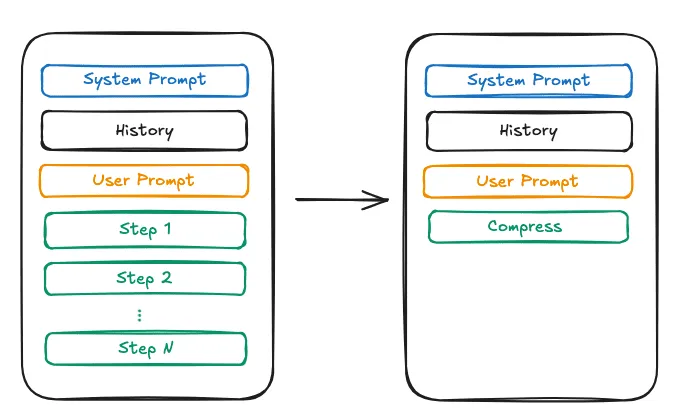
Compress
當 Context 越來越大時, 我們可以對其內容進行壓縮,以最小的 token 數保留盡可能多的資訊。 或者對內容進行剪枝。 然而風險是可能有些細節會被 LLM 給丟失導致上下文缺失,並且根據 Compress 或是剪枝的方式也會導致 KV Cache 失效
Isolation
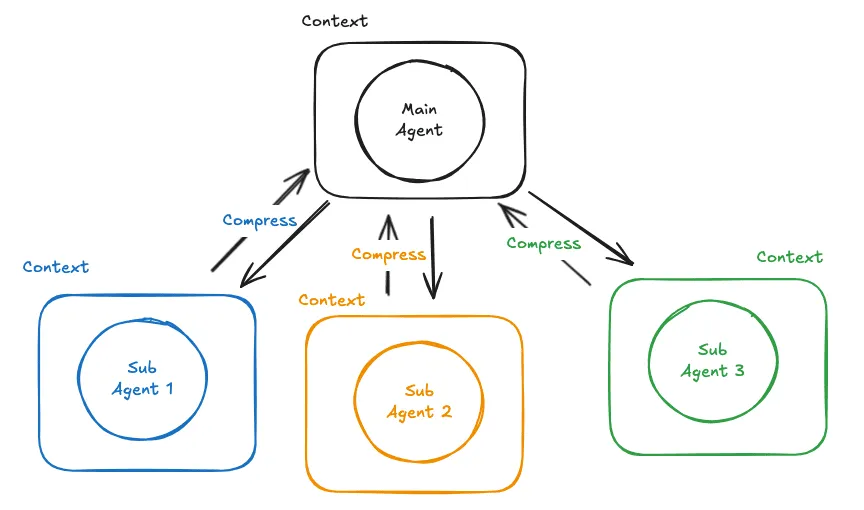
當任務可能會消耗大量 Context 時可以委託其他 Context 互相隔離的 Agent 去執行並且得到壓縮過後的 Summary 以達到減少 Main Agent 的 Context 消耗。然而風險一樣是細節可能被 Sub Agent 給丟失掉,並且會有較高的延遲以及總 token 消耗。